WebSocket 架构
名词解释
| 名称 | 代称 | 描述 |
|---|---|---|
| 第三方控制器 | client |
Coyote Claw 桌面应用 |
| WebSocket 服务器 | server |
内嵌在 Tauri 中的 Rust WS 服务器 |
| 郊狼手机软件 | target |
DG-LAB 官方 iOS/Android APP |
| 郊狼设备 | device |
Coyote 3.0 主机硬件 |
连接流程
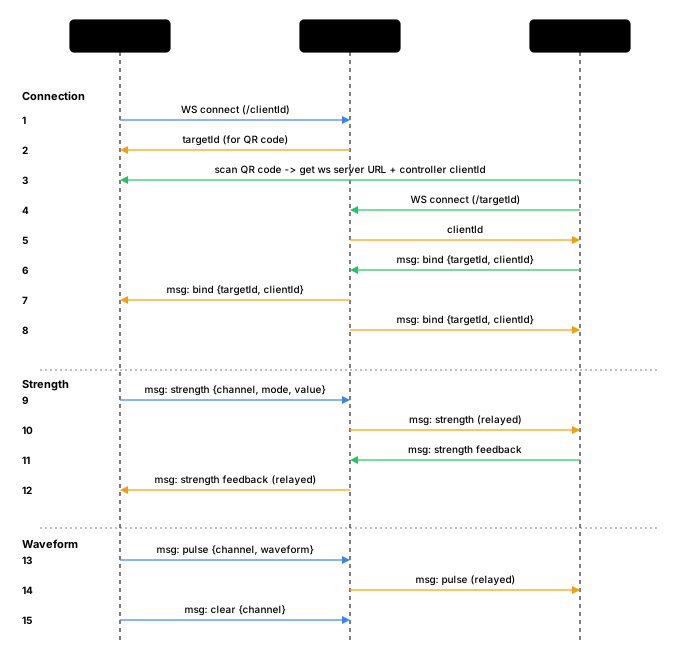
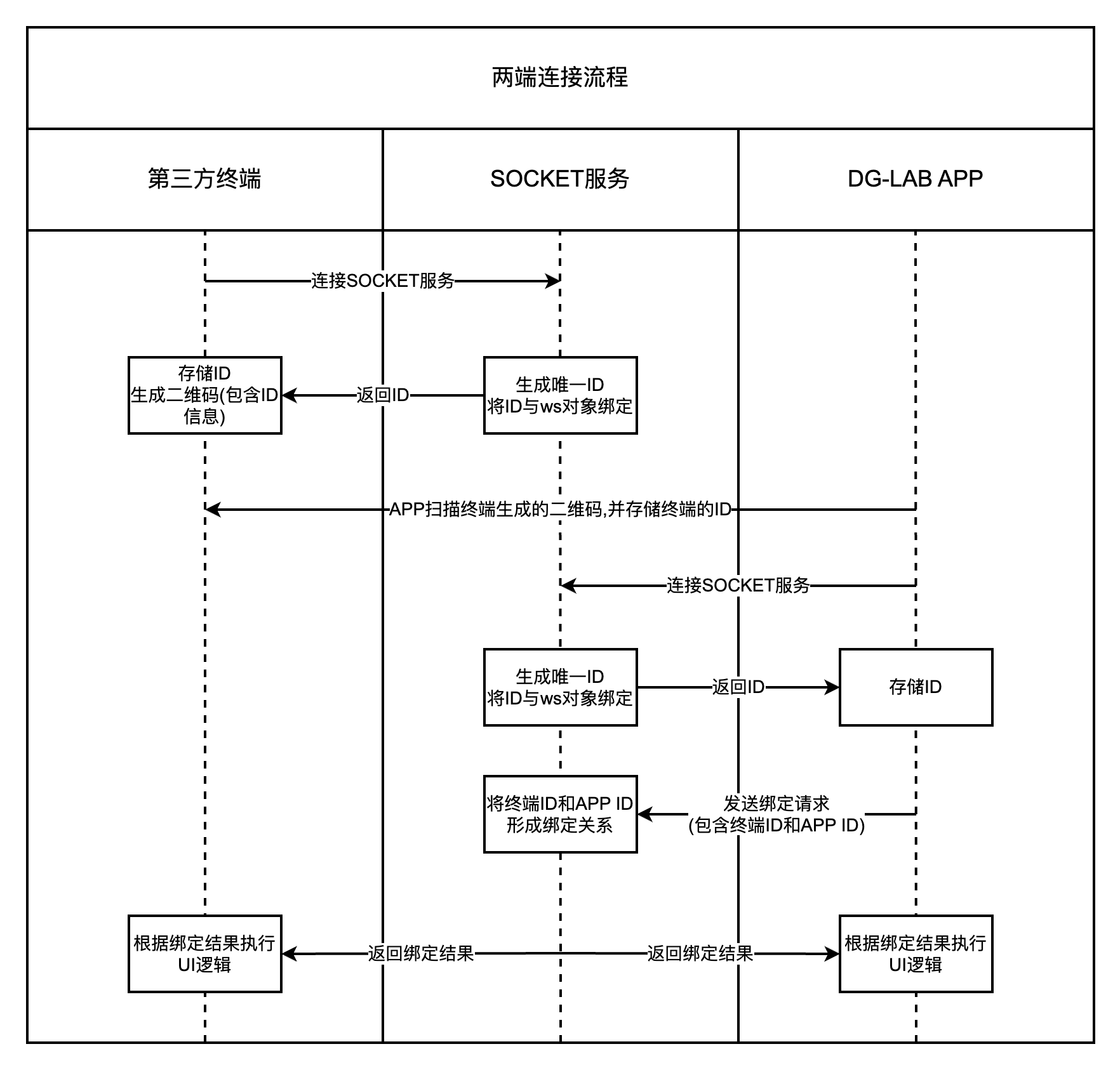
步骤详解
1. 启动服务器
Coyote Claw 启动时,Rust 后端在 0.0.0.0:9999 启动 WebSocket 服务器,并生成一个 UUID v4 作为 clientId。
2. 生成二维码
二维码内容格式:
https://www.dungeon-lab.com/app-download.php#DGLAB-SOCKET#ws://192.168.x.x:9999/CLIENT_ID
| 部分 | 说明 |
|---|---|
dungeon-lab.com/app-download.php |
官方 APP 下载地址 (兜底) |
#DGLAB-SOCKET# |
协议标识符 |
ws://192.168.x.x:9999 |
本机局域网 IP + 端口 |
/CLIENT_ID |
控制器的 UUID |
3. APP 扫码连接
APP 扫描二维码后,提取 WebSocket 地址并发起连接。
4. 服务器分配 targetId
服务器收到新连接后:
- 生成新的 UUID 作为
targetId - 发送初始 bind 消息:
{"type":"bind","clientId":"APP_ID","targetId":"","message":"targetId"}
5. APP 发送绑定请求
APP 回复: {"type":"bind","clientId":"...","targetId":"...","message":"DGLAB"}
6. 配对完成
服务器确认后回复 "200": {"type":"bind","clientId":"...","targetId":"...","message":"200"}
消息格式
WebSocket 服务器和 DG-LAB APP 之间所有消息均为 JSON:
{
  "type": "xxx",
  "clientId": "xxxx-xxxx-xxxx-xxxx",
  "targetId": "xxxx-xxxx-xxxx-xxxx",
  "message": "xxx"
}
字段说明:
| 字段 | 类型 | 说明 |
|---|---|---|
type |
string | 消息类型: bind / msg / break / heartbeat / error |
clientId |
string | 第三方控制器的 UUID |
targetId |
string | DG-LAB APP 的 UUID |
message |
string | 消息体 (始终是字符串) |
type 说明:
| type | 说明 |
|---|---|
bind |
关系绑定 (连接/配对/断开) |
msg |
命令消息 (强度/波形/清空/反馈) |
break |
对方断开连接通知 |
heartbeat |
心跳 (默认 60s 间隔) |
error |
错误消息 |
最大消息长度: 1950 字符,超出会被 APP 丢弃。
消息类型
适用范围
以下协议描述的是 WS 服务器 ↔ DG-LAB APP 之间的固定协议 (无法修改)。控制器与 WS 服务器之间的协议后续会设计独立的 JSON API。
服务器 → APP
通道强度修改
message 格式: strength-{通道}+{模式}+{值}
| 参数 | 取值 | 说明 |
|---|---|---|
| 通道 | 1 = A 通道, 2 = B 通道 |
选择控制哪个通道 |
| 模式 | 0 = 降低, 1 = 增加, 2 = 设置为 |
强度变化方式 |
| 值 | 0 ~ 200 |
变化量或目标值 |
示例:
| 操作 | message |
|---|---|
| A 通道强度 +5 | strength-1+1+5 |
| B 通道强度归零 | strength-2+2+0 |
| B 通道强度 -20 | strength-2+0+20 |
| A 通道强度设为 35 | strength-1+2+35 |
波形操作
message 格式: pulse-{通道}:[hex_data_array]
| 参数 | 取值 | 说明 |
|---|---|---|
| 通道 | A 或 B |
注意这里是字母不是数字 |
{
  "type": "msg",
  "clientId": "xxxx",
  "targetId": "xxxx",
  "message": "pulse-A:[\"0A0A0A0A64646464\",\"0A0A0A0A32323232\"]"
}
- 数组最大 100 个单元 (= 10 秒)
- APP 波形队列最大 500 个单元 (= 50 秒)
- 每个单元格式详见 波形数据
清空波形队列
message 格式: clear-{通道}
| 参数 | 取值 | 说明 |
|---|---|---|
| 通道 | 1 = A, 2 = B |
注意这里是数字不是字母 |
APP → 服务器
强度反馈
当 APP 中的通道强度或强度上限变化时,会上报:
message 格式: strength-{A强度}+{B强度}+{A上限}+{B上限}
所有值范围 0 ~ 200。
按钮反馈
message 格式: feedback-{index}
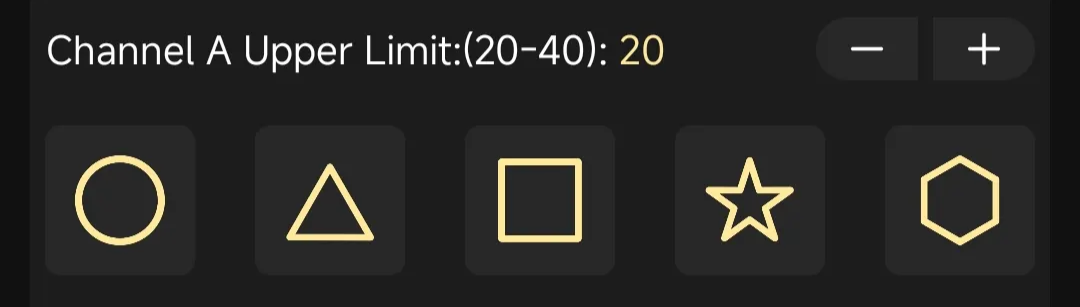
| index | 通道 | 按钮位置 |
|---|---|---|
| 0 ~ 4 | A 通道 | 从左到右 |
| 5 ~ 9 | B 通道 | 从左到右 |
系统消息
| type | message | 说明 |
|---|---|---|
bind |
targetId |
初始连接,服务器分配的 ID |
bind |
DGLAB |
APP 请求绑定 |
bind |
200 |
绑定成功 |
break |
209 |
对方断开连接 |
heartbeat |
200 |
心跳响应 |
错误码
| Code | 说明 |
|---|---|
| 200 | 成功 |
| 209 | 对方断开连接 |
| 400 | ID 已被其他客户端绑定 |
| 401 | 目标客户端不存在 |
| 402 | 双方未配对 |
| 403 | 消息不是有效 JSON |
| 404 | 接收方不在线 |
| 405 | 消息超过 1950 字符 |